
Using OMOP Concepts
Find the right standard concept for each of your local variables
The Singapore harmonised OMOP vocabulary is a curated reference for mapping source clinical terms to OMOP concepts. You can explore it in OMOP Concepts Search. This guide explains how to find and choose the right OMOP concept for each of your variables.
Cleaning your data beforehand and loading the mapped data into OMOP tables are covered in Deploying OMOP.
Where to look, in order
Singapore harmonised vocabulary
OMOP Concepts Search
ATHENA
then Usagi for long lists
Feedback to NDCT
NDCT common mailbox
Before you start
You need to be a TRUST Member. Find out how to register.
Have a list of your cohort's variables at hand, with a short description and a few example values for each.
Log in to the TRUST Members' Portal and open Metadata Catalogue › OMOP Concepts Search.
1. Search OMOP Concepts Search
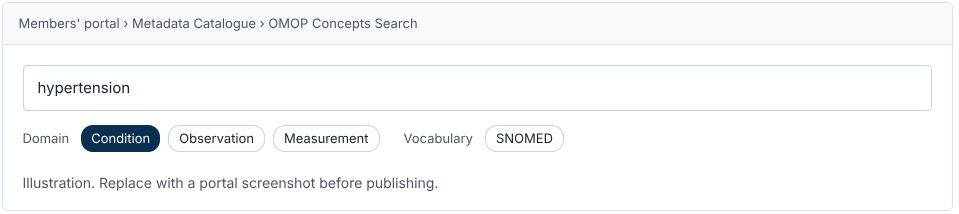
Start by searching for the source term or code. Use keywords, source codes, abbreviations or alternative clinical terms. If another cohort has already mapped a variable like yours, reuse that concept: it keeps mappings consistent and saves you the work. One search box looks across concept names, descriptions, local variable names and concept IDs at the same time. Some ways to search:
Start with the clinical term
Use plain words, such as "hypertension" rather than "HTN".
Try your own variable name
Another Singapore cohort may already have mapped a variable like yours.
Narrow with filters
Use the Domain and Vocabulary filters when a search returns too many results.
Already have an ID?
Type the concept ID to go straight to that record, then check the name matches.
Hundreds of variables? Your scripts can query the same index through the OMOP Concept Search API.
2. Identify the OMOP domain
Work out which OMOP domain the information belongs to. The domain decides how, and in which table, the data is held in the OMOP Common Data Model. A diagnosis is a Condition; a blood pressure reading is a Measurement.

3. Refine and validate the concept
Choose the vocabulary
Filter the results by the vocabulary that suits your domain.
Vocabulary | Use it for |
|---|---|
SNOMED | Clinical conditions, most observations, most procedures and some measurements |
LOINC | Laboratory tests and measurements |
RxNorm / RxNorm Extension | Medications and drug products |
UCUM | Units of measurement |
Validate the concept
Review each candidate concept against your variable with this checklist.
Concept name
Does it describe what your variable records?
Clinical meaning
Does it mean the same as your variable, in context?
Concept class
Is it the right kind of concept, such as a disorder or a lab test?
Specificity
Is it as specific as your variable, no broader and no narrower?
Standard
Is it a standard concept?
Validity
Is it still valid in the current release?
Reading a concept record
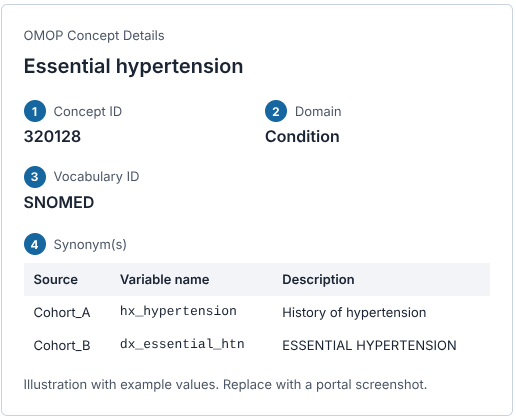
Concept ID - The number you record in your mapping. Names can be reworded between releases, so always use the ID
Domain - Decides which OMOP table your data goes into. Check it fits what your variable records: a diagnosis is a Condition, a blood pressure reading is a Measurement.
Vocabulary - The standard the concept comes from, such as SNOMED for clinical findings.
Synonyms - Local variables from Singapore cohorts that are already mapped to this concept. If one looks like your variable, that's a good sign you've found the right concept.
Recording your choice
Record each mapping in the same format the National Data Curation Team uses, so your mappings can be shared and reused. Always record the concept ID, as names can be reworded between releases. Here's an example for a cohort variable called htn_dx.
a. Search "hypertension" and open Essential hypertension.
b. Check the domain is Condition, which fits a diagnosis variable, and that similar variables from other cohorts appear under Synonyms.
c. Grade how close the match is, then add a row to your mapping table.
Match grades
Equal
The concept matches your variable exactly.
Equivalent
The concept mostly matches your variable.
Wider / Narrower
The concept is broader or narrower than your variable.

Variables with categorical answers, such as country of birth, also get a child table that maps each answer value. See the detailed Using OMOP Concepts guide in the Members' Portal for both formats.
Note the vocabulary version
Concepts can change between releases. Note the version you mapped against (currently v1.1) so you can recheck when a new one comes out.
Get a second pair of eyes
Ask a colleague, ideally a clinician, to check mappings for key variables before you use them.
Check what the variable really records. A self-reported questionnaire answer and a doctor's diagnosis may need different concepts even when the wording is the same. If you're unsure, you can consult the Data Standardisation Technical Working Group (part of the CoP).
More questions, such as when to use a concept set instead of a single concept? See the OMOP FAQs.
4. Search ATHENA, or use Usagi
First try a broader or alternative term, clear the Domain filter, and search your variable name to see how other cohorts handled something similar. If OMOP Concepts Search still has no suitable mapping:
Search ATHENA (opens in new tab), the OHDSI vocabulary browser, for a valid, standard OMOP concept. Apply the same domain, vocabulary and validation checks.
If your source data already uses a coded vocabulary, such as ICD-10, look the code up in ATHENA and follow its Maps to relationship to the standard concept.
For a long list of terms, use Usagi (opens in new tab), an OHDSI tool that suggests concepts in bulk for you to review.
Setting up Usagi is covered in the detailed guide in the Members' Portal.
5. Give feedback on mappings
If a mapping in the Singapore harmonised OMOP vocabulary looks incorrect or questionable, or one is missing, tell NDCT through the NDCT common mailbox. Feedback feeds into future releases of the vocabulary.
Where you can, include:
the source term or code
the existing mapping, if there is one
your proposed alternative
why you think it should change
6. Get guidance from NDCT
For complex mapping questions, contact the National Data Curation Team (NDCT) through the same mailbox. Subject to the team's scope and availability, NDCT can advise on terminology mapping and related topics, including ETL design, data standardisation and data quality assessment.